


If you’ve been on Instagram at all this past week, you’ve no doubt noticed many of your favorite artists announcing they’re leaving the platform. In mid-October, Meta updated its commercial terms. Starting November 20, 2026, business accounts on Facebook, Instagram, and WhatsApp agree that Meta can use automated tools to collect content from websites linked to those accounts, and use it to train its AI products.
For working creatives, the neverending cycle of updated terms and conditions and increasingly generative AI-friendly policies on social media are exhausting. What gets scraped isn’t generic site content. It’s your portfolio. The style and work you’ve spent years developing could become training data. The idea that your creativity could end up shaping an AI system, just because you linked your portfolio in an Instagram bio, feels like a breach of trust.
So, here’s a practical look at what’s actually changing, how AI scraping works, what Format already does to protect your portfolio, and what your options are when it comes to protecting your work.

What Meta’s new terms actually say
Según reporting from Nieman Lab*, the updated terms allow Meta, or anyone acting on its behalf, to use automated software such as scrapers and bots to collect content from websites associated with its business customers. That content can be used to “train” Meta products, including its AI.
There are two primary details to note:
- Who counts as a business customer is broad. Meta’s definition includes any account running ads, selling or listing products, managing a Page, or using business tools like Meta Business Suite. Many photographers, illustrators, and designers with professional accounts fall into that group.
- There is no opt-out apart from leaving. The update tells businesses that don’t agree to stop using Meta’s products for business purposes.
Meta told reporters that site owners can still control access through robots.txt, the file that tells bots which parts of a site they may visit. Legal experts pointed out that the terms themselves don’t promise to respect it. That gap is why so many people are worried.
*An important thing to note: The Nieman Lab article linked above states that Meta’s new terms go into effect on October 30th, 2026, however Meta’s terms preview lists a November 20th, 2026 date, instead.
What is AI scraping? Not every crawler is the same
“AI scraping” covers a few different activities, and they don’t affect your work in the same way. Format groups AI crawlers into three types:
| Crawler type | What it does | Does it train AI on your work? | Format’s default |
|---|---|---|---|
| Search indexing | Reads your site so it can appear in search results, including Google’s AI Overviews | No | Allowed, so people can find you |
| User-requested fetching | Fetches a page when someone asks an AI tool to summarize or look something up | No | Allowed |
| Training crawlers | Downloads text and images to train generative AI models | Sí | Blocked |
The difference matters. Blocking every bot that mentions AI would also cut your portfolio out of search, which hurts the art directors, galleries, and clients trying to find you. The thing to stop is training.
How Format protects your portfolio from AI training crawlers
Every Format portfolio blocks generative AI training crawlers by default. You don’t have to install anything or edit code to enable this.
The block happens at the network level, through our content delivery network (Cloudflare), before a training crawler reaches your images. That adds a layer robots.txt can’t offer on its own. A robots.txt file is a polite request that well-behaved bots choose to follow. Cloudflare keeps a public reference list of the AI crawlers it identifies.
Format also doesn’t share or sell member content for AI training. Your body of work stays yours.
To check or change the setting:
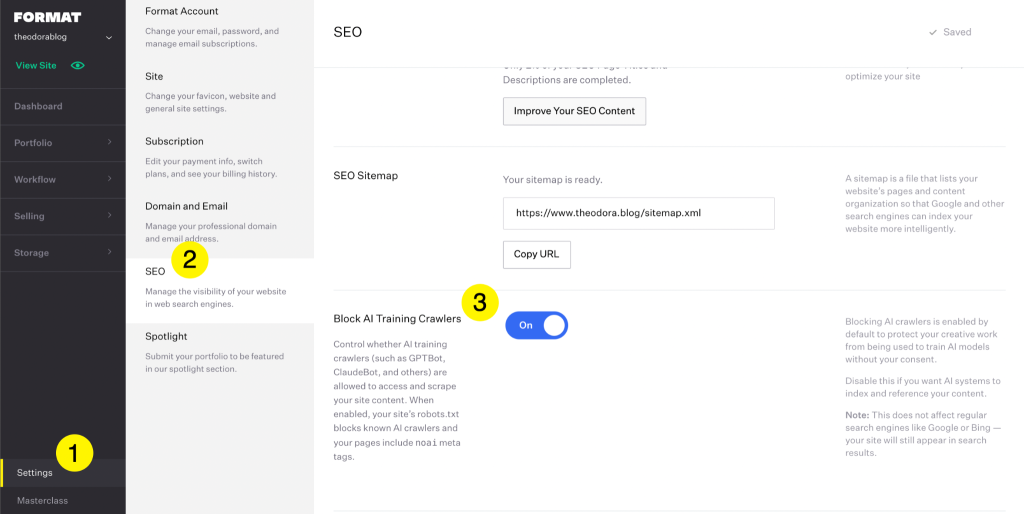
- Go to Ajustes in your Format dashboard.
- Open the SEO panel.
- Scroll down to Block AI Training Crawlers. It’s on by default. If you ever choose to let training crawlers in, you have to turn it off yourself.
For the full technical breakdown, see our help article on how Format protects your content from AI.
What a crawler block can’t do
We’d rather be honest with you than oversell. A training-crawler block is strong protection, but it isn’t a force field:
- It doesn’t change what you agree to with Meta. If you keep a Meta business account, the contract you accept with Meta is a separate matter from the technical block on your portfolio. Read the terms and decide for yourself.
- It doesn’t cover what you post on Meta’s own platforms. Images uploaded to Instagram or Facebook live on Meta’s servers, not your Format site.
- It can’t stop a scraper pretending to be a person. No platform can fully block a bot that hides its identity, or someone saving screenshots.
- It can’t undo past scraping. Work collected before protections existed may already be in older datasets.
Can Meta use my photos for AI? It depends where they live
| Where your work is | Who controls it | What protects it |
|---|---|---|
| Posted on Instagram or Facebook | Meta’s platform terms | Meta’s own settings and regional data laws, if they apply to you |
| On your Format portfolio | You | Format’s default training-crawler block, plus password protection for private work |
| Linked from a Meta business account | Your portfolio host technically, with Meta’s commercial terms taking precedence | Your own decision about whether to keep the business account |
This is where having a dedicated portfolio site proves its worth. On social platforms, you rent space under someone else’s rules. On your portfolio, you decide the presentation and who gets access.
A layered checklist for protecting your work from AI
No single tool solves everything, so it can be helpful to combine a few that fit how you work:
- Keep your full-resolution, finished work on your portfolio, where training crawlers are blocked by default. Use social for web-resolution previews, crops, and behind-the-scenes images.
- Password-protect unreleased series and client work. Private, password-protected pages are the strongest protection you have for images that aren’t ready to be public.
- Cloak images you post to social. Tools from the University of Chicago’s Glaze Project make pixel-level changes you can barely see, which disrupt how AI models read your style.
- Put AI terms in writing. Add a no-AI-training clause to client contracts and licensing agreements. Our guide to AI and copyright for artists explains where the law currently stands.
- Know your baseline rights. Copyright protection begins the moment you create the work. Our photography copyright law guide covers registration, notices and watermarking.
- Review your Meta business setup. Check which websites are linked to your business account, and decide whether the professional features are worth the new terms.

Should you also block AI search crawlers?
Probably not, unless keeping your work private matters more to you than being found. More and more clients find creatives through Google’s AI Overviews and AI assistants, and those answers rely on search-indexing crawlers that don’t train models on your images. Blocking them can make you harder to discover without adding much protection.
If being found in AI search is part of your strategy, read our guide to AI search optimization for photographers. It covers how to show up in AI answers while your training-crawler protection stays on.
Frequently asked questions
Does Format use my work to train AI?
No. Format doesn’t share or sell member content for AI training models.
Will blocking AI training crawlers hurt my SEO?
No. Format blocks training crawlers only. Search-indexing crawlers can still reach your site, so your portfolio stays discoverable.
Can I let AI training crawlers access my site?
Yes, but only if you choose to. Turn off Block AI Training Crawlers en Settings > SEO.
Does this protect images I post on Instagram?
No. Content uploaded to Meta’s platforms is covered by Meta’s terms, not by your portfolio settings.
Your work, on your terms
Panic spreads quickly on social, but the creatives in the best position right now are the ones whose best work lives in a space they control. Keep your strongest work on your portfolio, use social as a preview rather than an archive, and make sure you know which settings are working for you. Format’s training-crawler protection is already on, so you can spend your time on the work.
Your portfolio, your rules. Give your body of work a home built to keep AI training crawlers out. Try Format free today.